What is Bannertik?
BannerTik is a name used by third-party sites about TikTok profile customization. The bannertik.online page describes a modified app and claims image or GIF backgrounds behind profile information. We have not verified those features or an official TikTok rollout. Similar names, including bannertik.com and bannertiktok.online, do not establish shared ownership.
For a connected picture across three post thumbnails, RepostGrid works as a TikTok banner splitter: it cuts your design into three still images in your browser. No app installation or TikTok login is needed.
Two different things called a TikTok banner
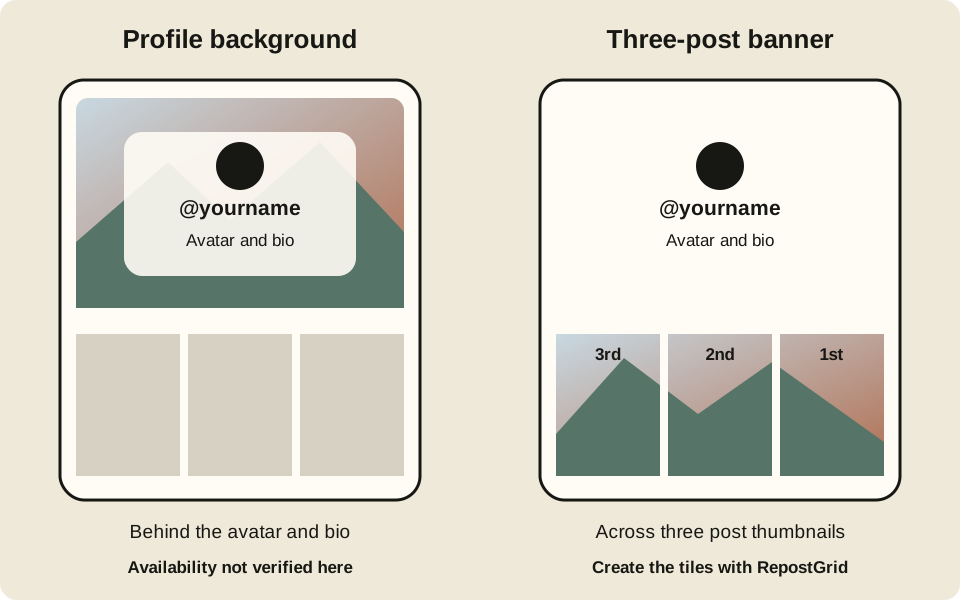
| Difference | Profile background | Three-post banner |
|---|---|---|
| Where it appears | Behind the avatar, username and bio | Across a row of three post thumbnails |
| What it changes | The profile header area | The images shown in your posts or Reposts tab |
| What RepostGrid provides | No background setting, app installer or feature unlock | Three still image tiles, a grid preview and posting-order labels |
| Animation | GIF claims on third-party sites are not verified by this guide | Still JPG, PNG or WebP images |
A three-post banner leaves your avatar and bio area unchanged. Choose this method if you want artwork across your post grid; it will not reproduce a background behind your profile information.
How to make a TikTok banner in 3 steps
- Upload a photo or start blank. Open the TikTok banner maker. Use your own image, try a sample, or choose a solid color or gradient and add your name, quote or @handle.
- Adjust the crop and check the grid. Choose the TikTok banner layout. Use Fit or Fill, drag and zoom, then check the profile preview. Keep faces and small letters away from the two cut lines.
- Download and post the three tiles. Save each numbered image, download a ZIP, or use the phone's share sheet where supported. Publish separate photo posts in this order: right, middle, left. Pin the three posts where that option is available and check their alignment.
If the pieces are reversed or move when you add another post, follow the posting order and pinning guide. For a walkthrough of the editor, see how to make a TikTok banner.
For artwork in your Reposts tab, use the repost banner maker and its instructions. The placement is still a row of post thumbnails, not a profile-header background.
What you can create with the banner maker
- A photo banner. Split a landscape, portrait or your own artwork into three connected tiles, with a preview before you export.
- A name or quote banner. Start with a color or gradient and add text. Keep each word readable in the small profile thumbnails.
- Images ready to save. Export still JPG, PNG or WebP tiles with posting-order labels, free and without a watermark or sign-up.
- Editing on your device. Image splitting happens in your browser. Your source photo is not uploaded to make the tiles.
A three-post row can introduce your name, feature your artwork or mark a new project. Preview both the complete row and each individual tile so the separate posts still make sense.
What TikTok banner size should you use?
| Layout | Full canvas | Each of 3 tiles |
|---|---|---|
| Standard banner | 3240 × 1440 px | 1080 × 1440 px (3:4) |
| Full-screen tiles | 3240 × 1920 px | 1080 × 1920 px (9:16) |
For full-screen tiles, keep essential content inside the middle 3:4 area shown in the grid preview. These are this tool's export dimensions, not a specification for a profile background. Check the result in your TikTok app because thumbnail cropping can vary between views.
See the TikTok banner size and safe-zone guide for the crop diagram and text placement tips.
Fit or Fill: keep the whole image or fill the row?
Fit keeps the whole photo visible and can leave background space when its shape differs from the banner. Use it for artwork, logos or a portrait you do not want to crop.
Fill covers the banner and crops the parts outside it. Use it when an uninterrupted photo matters more than keeping every edge. Drag the image to choose the crop, then check all three tiles.
Place a face within one tile and avoid cutting small text at a seam. A larger source image helps keep the 1080-pixel-wide exports sharp; exporting a small image at a larger size cannot restore missing detail.
What if you want a profile background or GIF?
RepostGrid cannot enable either feature in your TikTok account. Generating an image, visiting this guide or downloading tiles does not change which settings your account has.
We have not verified an official TikTok rollout, account eligibility rules or GIF support for the background described by third-party sites. This guide therefore does not promise a Change background button or provide steps for unlocking one.
We also do not provide BannerTik APK or IPA files, installation tasks or download lockers. If you want a picture across the post grid instead, create a three-post banner.